Applications
Rental application
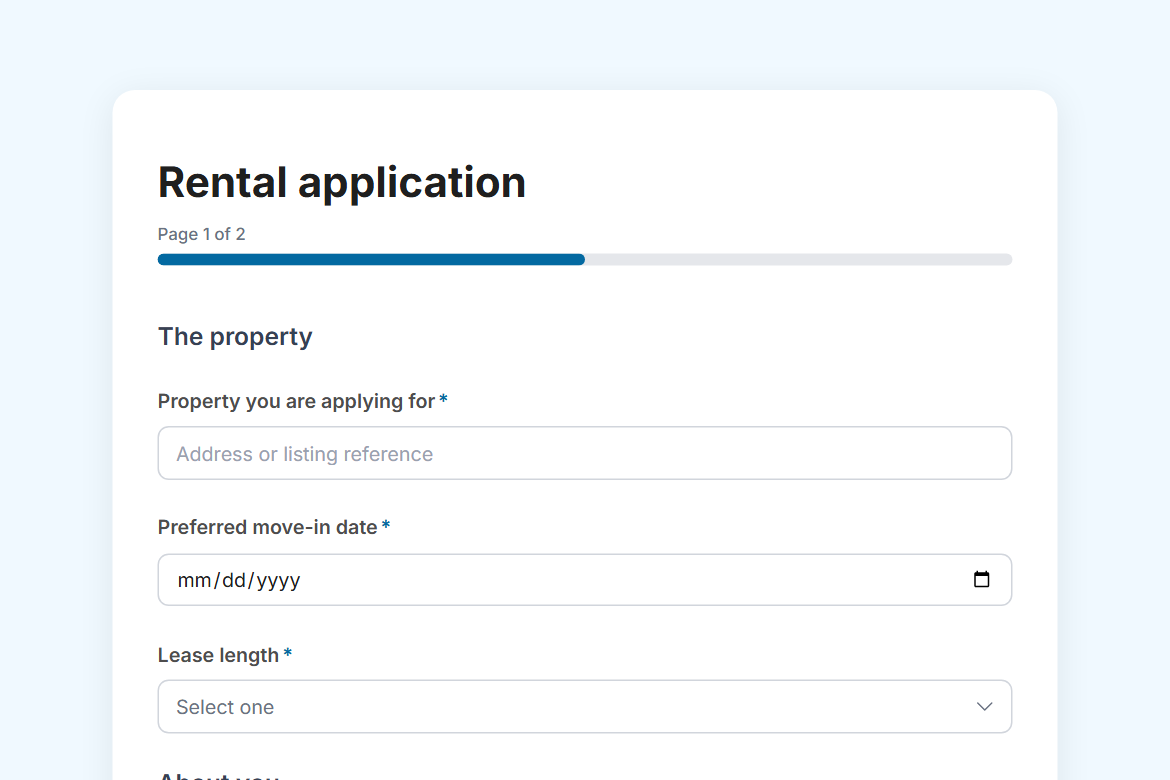
A rental application for landlords and letting agents: the applicant, their current home, employment and income, pets, references, ID and consent to checks, then the landlord's decision.
What is in the form
Page 1: The property
- Property you are applying for
- Preferred move-in date (date)
- Lease length (dropdown)
- First name
- Last name
- Date of birth (date)
- Phone
- Who else will live at the property? (Name, Relationship to you, Age for each occupant)
- Current address (address)
- How long have you lived there?
- You currently (dropdown)
- Current landlord or agent
- Reason for moving
Page 2: Employment and income
- Employment status (one of 6)
- Employer or business
- Job title
- Monthly income before tax
- Can you provide a guarantor if asked? (yes or no)
- Do you have pets? (yes or no)
- What pets, and how many?
- Does anyone in the household smoke? (yes or no)
- Vehicles needing parking
- References (long answer)
- Photo ID (file upload)
- I consent to credit, reference and identity checks, and confirm the information given is true. (yes or no)
“What pets, and how many?” only appears when someone answers “yes” to “Do you have pets?”.
It opens with a welcome screen (“Apply for this property”) and ends with a thank-you message you can edit.
After someone submits
An approval by email (Pro). Each submission goes to an approver you name, with the answers and two buttons: “Approve” and “Decline”. The rest of the workflow follows their decision.
The workflow comes with the form, switched off until you fill in the blanks: the approval needs Pro.
Make it yours
Change anything in the builder: nothing goes live until you publish.